
OpenStreemMap Nominatim
使用 requests 連線到 https://nominatim.openstreetmap.org 查詢。
免費方案 : 每日查詢次數無限制
連線速度 : 自動限制一秒一次
api key : 不需註冊,亦不需 api key
地址資訊 : 較為詳細
請先安裝套件
pip install requests
完整代碼如下
上述的 email 隨便填入即可,它不會檢查此 email 是否正確。而且不需暫緩執行,因為會自動限制一秒後才會回應。
geopy 套件
使用 geopy 套件,由 OpenStreetMap 提供的 Nominatim 反向地理編碼查詢,完全不需付費,每秒限制只能查詢一次,所取得的地址資料沒有上述的方法詳細。
免費方案 : 每日查詢次數無限制
連線速度 : 自動限制一秒一次
api key : 不需註冊,亦不需 api key
地址資訊 : 較為簡易
請先安裝如下套件
pip install geopy
完整代碼如下
上述的 email 隨便填入即可,它不會檢查此 email 是否正確。而且不需暫緩執行,因為會自動限制一秒後才會回應。
使用 Nominatim 網頁
可到如下網址查詢 https://nominatim.openstreetmap.org/ui/reverse.html。修改網頁上的 lat 及 lon,然後按下 Search 就可以搜尋地址。
這個網頁也可以寫成 selenium 來爬蟲,但爬蟲的速度不能太快,否則很容易被封鎖 ip。
請先安裝如下套件。
pip install selenium webdriver-manager mysql-connector-python
完整 selenium 代碼如下。
LocationIQ
LocationIQ 是另一種查詢方式,地址資訊較不準確。
免費方案 : 每日限制查詢 5000次
連線速度 : 每秒不可超過二次
api key : 需註冊並取得 api key
地址資訊 : 較為簡易
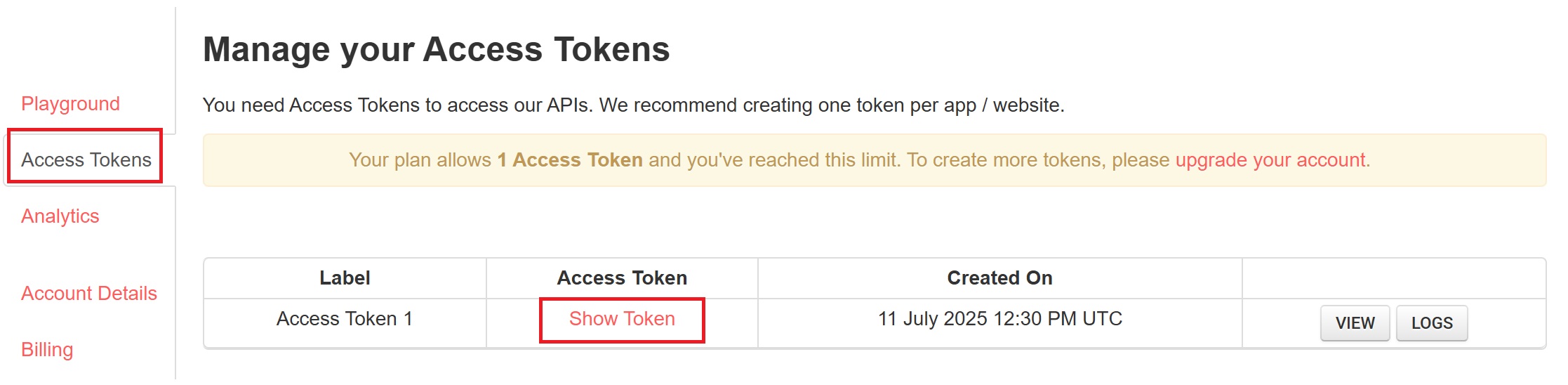
請到 https://locationiq.com/ 註冊,登入後按下「Access Tokens」即可取得 api。
完整代碼如下
Google Map 暴力爬蟲
此法已失效了,僅作記錄。
將經緯度轉換地址,目前就只有 Google 的 Geocoding API 可以使用,但 Geocoding API 是需要付費的,所以本範例使用 Google Map 暴力爬蟲程式,完全不需付費。
底下的代碼,故意拼命的查,每當查詢到 170筆左右,就會被 Google Map 認定為機器人而彈出確認的畫面。Google Map 有一個特性,就算被認定為機器人,只要關掉瀏覽器,再重新啟動即可,不會鎖 IP。
所以本程式故意不使用 time.sleep(2),當被判定為機器人時,address 返回 None 值。主程式收到 address 為 None ,就關閉瀏覽器並重新啟動,繼續拼命的查,夠暴力吧! 因為本人每天要查上萬筆資料,每筆停留2秒,那還得了。
希望 Google 不要看到此篇文章,不然又想出啥防制方法,那就頭大了。
#pip install selenium webdriver-manager
import mysql.connector as mysql
from selenium import webdriver
from selenium.webdriver.chrome.options import Options
from selenium.webdriver.chrome.service import Service
from selenium.webdriver.common.by import By
from selenium.webdriver.support.wait import WebDriverWait
from webdriver_manager.chrome import ChromeDriverManager
from selenium.webdriver.support import expected_conditions as EC

def dms(x):#經緯度轉度分秒
    #1度 : 60分
    #1分 : 60秒
    d=int(x)
    m=int((x-d)*60)
    s=(x-d)*3600-m*60
    return f'{d}°{m}\'{s}"'
def getAddress(lat, lng):
    lng=dms(lng)
    lat=dms(lat)
    browser.get(f"https://www.google.com/maps/place/{lat}N+{lng}E")
    try:
        WebDriverWait(browser, 3).\
            until(EC.presence_of_element_located(
                (By.ID,'searchbox-searchbutton')
            )
        )
        node=browser.find_element(
            By.XPATH,value='//meta[@itemprop="description"]'
        )
        address=node.get_attribute("content")
        return address[3:]
    except:
        print("被判定為機器人了,重啟瀏覽器中...")
        return None
conn=mysql.connect(host="localhost",
                   user="登入資料庫帳號",
                   password="登入資料庫密碼",
                   database="資料庫")
cursor=conn.cursor()
cursor.execute("select * from covid19")
rs=cursor.fetchall()
conn.close()
ops=Options()
ops.add_argument('--headless')
ops.add_experimental_option('detach',False)
service=Service(ChromeDriverManager().install())
browser=webdriver.Chrome(service=service, options=ops)
total=len(rs)
conn=mysql.connect(host="localhost",user="thomas", password="xxx", database="cloud")
cursor=conn.cursor()
for i, r in enumerate(rs):
    address=None
    while address is None:
        address=getAddress(r[3], r[2])
        if address is None:#沒取得地址,因為 google map 判定本程式是機器人
            #被判定是機器人時,並不會鎖 ip, 只要瀏覽器重開,就可以繼續爬蟲
            browser.close()
            browser=webdriver.Chrome(service=service, options=ops)
    print(f"{i+1}/{total} {r[2]:.8f},{r[3]:.8f} : {address}")
    cmd=f"insert into 地址 (經度, 緯度, 地址) values ({r[2]}, {r[3]}, '{address}')"
    cursor.execute(cmd)
    conn.commit()
conn.close()