
PyQT6 圖片瀏覽
手動瀏覽
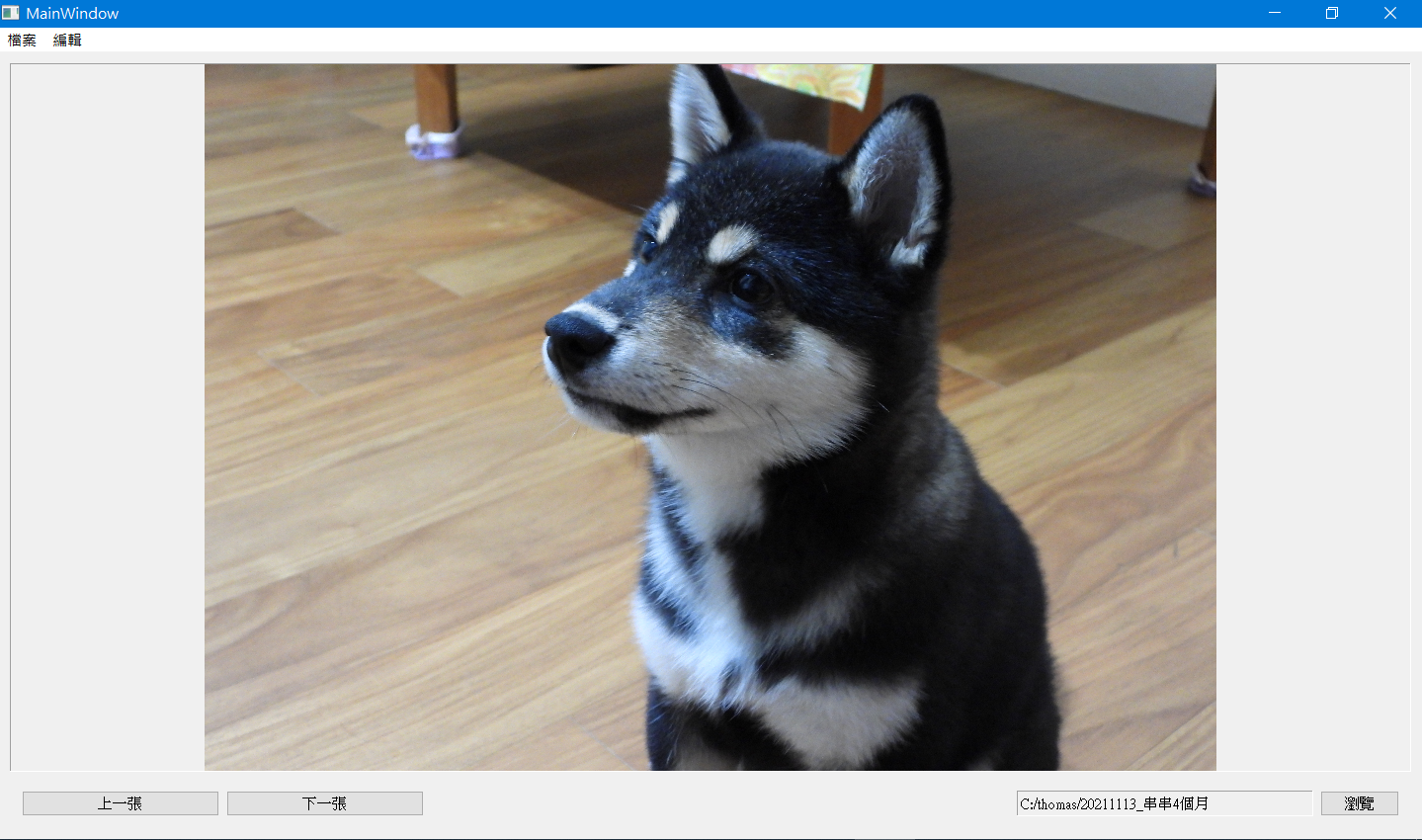
底下代碼,可手動下一張及上一張瀏覽
import os
import sys
import numpy as np
import cv2
from PyQt5.QtGui import QImage, QPixmap
from PyQt5.QtWidgets import QMainWindow, QApplication, QFileDialog
from ui.ui_mainwindow import Ui_MainWindow
class MainWindow(QMainWindow, Ui_MainWindow):
    def __init__(self, parent=None):
        super().__init__(parent)
        self.setupUi(self)
        self.btnPath.clicked.connect(self.btnPathClick)
        self.btnPrev.clicked.connect(self.btnPrevClick)
        self.btnNext.clicked.connect(self.btnNextClick)
        path="c:/thomas"
        self.lblPath.setText(path)
        self.searchFiles(path)
    def searchFiles(self, path):
        self.files=[]
        self.index=0
        for file in os.listdir(path):
            if file.lower().endswith(".jpg") or \
                    file.lower().endswith(".png") or \
                    file.lower().endswith(".bmp"):
                self.files.append(os.path.join(path, file))
        if len(self.files)>0:
            self.showPicture(self.files[0])
    def btnPathClick(self, event):
        self.files=[]
        path = QFileDialog.getExistingDirectory()
        self.lblPath.setText(path)
        self.searchFiles(path)
    def btnPrevClick(self, event):
        self.index=(self.index-1+len(self.files))%len(self.files)
        self.showPicture(self.files[self.index])
    def btnNextClick(self, event):
        self.index=(self.index+1)%len(self.files)
        self.showPicture(self.files[self.index])
    def showPicture(self, file):
        img=cv2.imdecode(np.fromfile(file, dtype=np.uint8), cv2.IMREAD_UNCHANGED)
        img=cv2.resize(img, (1024, 768), interpolation=cv2.INTER_LINEAR)
        img=cv2.cvtColor(img,cv2.COLOR_BGR2RGB)
        img=QImage(img, img.shape[1], img.shape[0], img.shape[1]*3, QImage.Format_RGB888)
        self.lblPicture.setPixmap(QPixmap.fromImage(img))
if __name__=='__main__':
    app=QApplication(sys.argv)
    mainwindow=MainWindow()
    mainwindow.show()
    app.exec()
投影片
底下代碼,為投影片模式,會自動播放
main.py
import G, os, sys, cv2
from PyQt5.QtGui import QImage, QPixmap
from PyQt5.QtWidgets import QMainWindow, QApplication, QFileDialog
from pictureThread import PictureThread
from ui.ui_mainwindow import Ui_MainWindow
class MainWindow(QMainWindow, Ui_MainWindow):
    def __init__(self, parent=None):
        super().__init__(parent)
        self.setupUi(self)
        self.btnPath.clicked.connect(self.btnPathClick)
        self.slider.valueChanged.connect(self.changeTime)
        os.chdir("D:/pictures/primitive/2021")
        #path=os.path.dirname(os.path.abspath(__file__))
        path=os.getcwd()
        self.lblPath.setText(path)
        self.thread=PictureThread(path)
        self.thread.callback.connect(self.draw)
        self.thread.start()
    def resizeEvent(self, event):
        G.width = self.lblPicture.width()-10
        G.height = self.lblPicture.height()-10
        print(G.width, G.height)
        #self.lblPicture.setScaledContents(True)
    def changeTime(self):
        G.delay=self.slider.value()
        print(G.delay)
    def btnPathClick(self, event):
        self.thread.runFlag=False
        path = QFileDialog.getExistingDirectory()
        if path!='':
            self.lblPath.setText(path)
            self.thread=PictureThread(path)
            self.thread.callback.connect(self.draw)
            self.thread.start()
    def draw(self, image):
        sWidth=G.width
        sHeight=G.height
        pWidth=image.shape[1]
        pHeight=image.shape[0]
        pRate=pWidth/pHeight
        sRate=sWidth/sHeight
        if pRate>1:#橫向圖片
            if sRate>pRate:
                height=sHeight
                width = height*pRate
            else:
                width=sWidth
                height=width/pRate
        else:#直向圖片
            if sRate>pRate:
                height = sHeight
                width = height * pRate
            else:
                width=sWidth
                height = width/pRate
        img = cv2.resize(image, (int(width), int(height)), interpolation=cv2.INTER_LINEAR)
        img = QImage(img, img.shape[1], img.shape[0], img.shape[1] * 3, QImage.Format_RGB888)
        pix = QPixmap(img)
        self.lblPicture.setPixmap(pix)
if __name__=='__main__':
    app=QApplication(sys.argv)
    mainwindow=MainWindow()
    mainwindow.showMaximized()
    app.exec()
pictureThread.py
import os
import numpy as np
import cv2
from PyQt5.QtCore import QThread, pyqtSignal
import G
class PictureThread(QThread):
    callback=pyqtSignal(np.ndarray)
    def __init__(self, path, parent=None):
        super().__init__(parent)
        self.runFlag=True
        self.index=0
        self.images=[]
        self.path=path
    def run(self):
        print(G.width, G.height)
        for file in os.listdir(self.path):
            if file.lower().endswith(".jpg") or \
                    file.lower().endswith(".png") or \
                    file.lower().endswith(".bmp"):
                self.pic=os.path.join(self.path, file)
                img = cv2.imdecode(np.fromfile(self.pic, dtype=np.uint8), cv2.IMREAD_UNCHANGED)
                img = cv2.cvtColor(img, cv2.COLOR_BGR2RGB)
                self.images.append(img)
                self.callback.emit(img)
        if len(self.images)>0:
            while self.runFlag:
                img=self.images[self.index]
                self.callback.emit(img)
                self.index=(self.index+1)%len(self.images)
                self.msleep(G.delay)
G.py
delay=10
width=0
height=0
ui_mainwindow.ui
<?xml version="1.0" encoding="UTF-8"?>
<ui version="4.0">
 <class>MainWindow</class>
 <widget class="QMainWindow" name="MainWindow">
  <property name="geometry">
   <rect>
    <x>0</x>
    <y>0</y>
    <width>763</width>
    <height>561</height>
   </rect>
  </property>
  <property name="windowTitle">
   <string>MainWindow</string>
  </property>
  <widget class="QWidget" name="centralwidget">
   <layout class="QVBoxLayout" name="verticalLayout">
    <item>
     <widget class="QLabel" name="lblPicture">
      <property name="sizePolicy">
       <sizepolicy hsizetype="Ignored" vsizetype="Ignored">
        <horstretch>0</horstretch>
        <verstretch>0</verstretch>
       </sizepolicy>
      </property>
      <property name="frameShape">
       <enum>QFrame::Panel</enum>
      </property>
      <property name="frameShadow">
       <enum>QFrame::Sunken</enum>
      </property>
      <property name="lineWidth">
       <number>1</number>
      </property>
      <property name="text">
       <string/>
      </property>
      <property name="alignment">
       <set>Qt::AlignCenter</set>
      </property>
     </widget>
    </item>
    <item>
     <widget class="QFrame" name="frame">
      <property name="maximumSize">
       <size>
        <width>16777215</width>
        <height>50</height>
       </size>
      </property>
      <property name="frameShape">
       <enum>QFrame::StyledPanel</enum>
      </property>
      <property name="frameShadow">
       <enum>QFrame::Raised</enum>
      </property>
      <layout class="QHBoxLayout" name="horizontalLayout">
       <item>
        <widget class="QLabel" name="label">
         <property name="maximumSize">
          <size>
           <width>60</width>
           <height>16777215</height>
          </size>
         </property>
         <property name="text">
          <string>播放速度</string>
         </property>
        </widget>
       </item>
       <item>
        <widget class="QSlider" name="slider">
         <property name="minimumSize">
          <size>
           <width>500</width>
           <height>0</height>
          </size>
         </property>
         <property name="maximumSize">
          <size>
           <width>500</width>
           <height>16777215</height>
          </size>
         </property>
         <property name="minimum">
          <number>10</number>
         </property>
         <property name="maximum">
          <number>3000</number>
         </property>
         <property name="orientation">
          <enum>Qt::Horizontal</enum>
         </property>
         <property name="tickPosition">
          <enum>QSlider::TicksAbove</enum>
         </property>
         <property name="tickInterval">
          <number>100</number>
         </property>
        </widget>
       </item>
       <item>
        <widget class="QFrame" name="frame_2">
         <property name="frameShape">
          <enum>QFrame::StyledPanel</enum>
         </property>
         <property name="frameShadow">
          <enum>QFrame::Raised</enum>
         </property>
        </widget>
       </item>
       <item>
        <widget class="QLabel" name="lblPath">
         <property name="minimumSize">
          <size>
           <width>400</width>
           <height>30</height>
          </size>
         </property>
         <property name="maximumSize">
          <size>
           <width>400</width>
           <height>50</height>
          </size>
         </property>
         <property name="frameShape">
          <enum>QFrame::Panel</enum>
         </property>
         <property name="frameShadow">
          <enum>QFrame::Sunken</enum>
         </property>
         <property name="text">
          <string/>
         </property>
        </widget>
       </item>
       <item>
        <widget class="QPushButton" name="btnPath">
         <property name="minimumSize">
          <size>
           <width>0</width>
           <height>30</height>
          </size>
         </property>
         <property name="maximumSize">
          <size>
           <width>80</width>
           <height>16777215</height>
          </size>
         </property>
         <property name="text">
          <string>瀏覽</string>
         </property>
        </widget>
       </item>
      </layout>
     </widget>
    </item>
   </layout>
  </widget>
  <widget class="QMenuBar" name="menubar">
   <property name="geometry">
    <rect>
     <x>0</x>
     <y>0</y>
     <width>763</width>
     <height>20</height>
    </rect>
   </property>
   <widget class="QMenu" name="menu">
    <property name="title">
     <string>檔案</string>
    </property>
    <addaction name="actionOpen"/>
    <addaction name="actionOpen_old"/>
   </widget>
   <widget class="QMenu" name="menu_2">
    <property name="title">
     <string>編輯</string>
    </property>
   </widget>
   <addaction name="menu"/>
   <addaction name="menu_2"/>
  </widget>
  <action name="actionOpen">
   <property name="text">
    <string>Open New</string>
   </property>
  </action>
  <action name="actionOpen_old">
   <property name="text">
    <string>Open old</string>
   </property>
  </action>
 </widget>
 <resources/>
 <connections/>
</ui>